Are you looking for a fridge that helps manage your ingredients and food items easily? This Expanded Fridge mod review and tutorial will talk about everything to expect once you install this helpful mod!

For some reason, Stardew Valley lets you only have a single fridge in your upgraded house until you buy one at Robin’s. It isn’t cheap, but still affordable if you want to buy it, but the problem doesn’t end there. Be in the hassle of finding where your food storage is – or you can try Expanded Fridge.
In this brief review, we’ll talk about the mod, share my experience and verdicts, and teach you how to install it on Steam PC.
Highlights:
- Beginner-friendly.
- Easy access to all fridges.
- Hotkeys possible.
Lowlights:
- Existing bugs not fixed.
- May require further digging from the old files for functionality.
Requirements for Installation:
- SDV 1.5 or higher.
- SMAPI 3.3 or higher.
Overview
The Expanded Fridge makes it more convenient for you to access all your fridges. This mod includes the built-in addition for the second house upgrade and the ones you can buy from Robin’s shop. Whether your fridges are in the Cabin or Farmhouse, accessing them all at once is possible.
How to Install the Expanded Fridge Mod?
Before using any mods in Stardew Valley, install SMAPI first. Here’s how:
- Click here.
- Click on “Download SMAPI 3.13.2” You can either select “Direct Download” or “Nexus download”.

- Wait for the ZIP file to finish and extract.
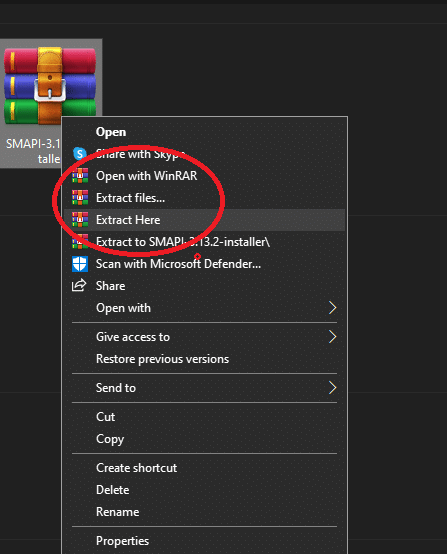
- Access the folder and pick an install button depending on your platform.

- A CMD prompt will appear, and it may get intimidating. Don’t worry. You have to press the “1” key two times and hit “ENTER” every question.

- Once SMAPI is on your Desktop, copy the following code:

- After that, open Steam> click “Library”> right-click on Stardew Valley> select “Properties” and copy the code on “Launch Options”.

Important Note: Make sure to launch the game first then exit as soon as it boots to avoid bugs.
Now with the mod:
- Download here. You can either manually or automatically install – whichever works for you.

- Open Steam again> right-click on Stardew Valley> hover over “Manage”> select “Browse Local Files’, and it will prompt you to a folder.

- Click the “Mods” folder> copy the zip file> extract> you’re good to go.

If you want to disable the mod and SMAPI, go to the exact location on Steam, where you input the code for activation.
Gameplay Experience

The mod is straightforward: place a fridge around the farmhouse or cabins. By doing so, I have control over all the storage with the tab changer. But there’s a problem – it’s not working.
I ended up restarting both SMAPI and the game, skipped one day, and all my fridges were gone. The uploader says it may be out of bounds (in the map), but it’s not there when I took a snapshot.

Thankfully, my food items are not lost because disabling the mod somehow makes all your fridges appear magically.
Final Verdict
It’s a reliable and helpful mod for greater access, if not only for the bug. Another player has the same ordeal as mine, which hasn’t received any attention from the owner.
Overall, Expanded Fridge is an exciting piece of work, but for now, you might want to check other fridge mods for better gameplay.